How to Plan a Printed Product Catalogue: Pages, Photography, Products and Binding
How to Plan a Printed Product Catalogue: Pages, Photography, Products and Binding
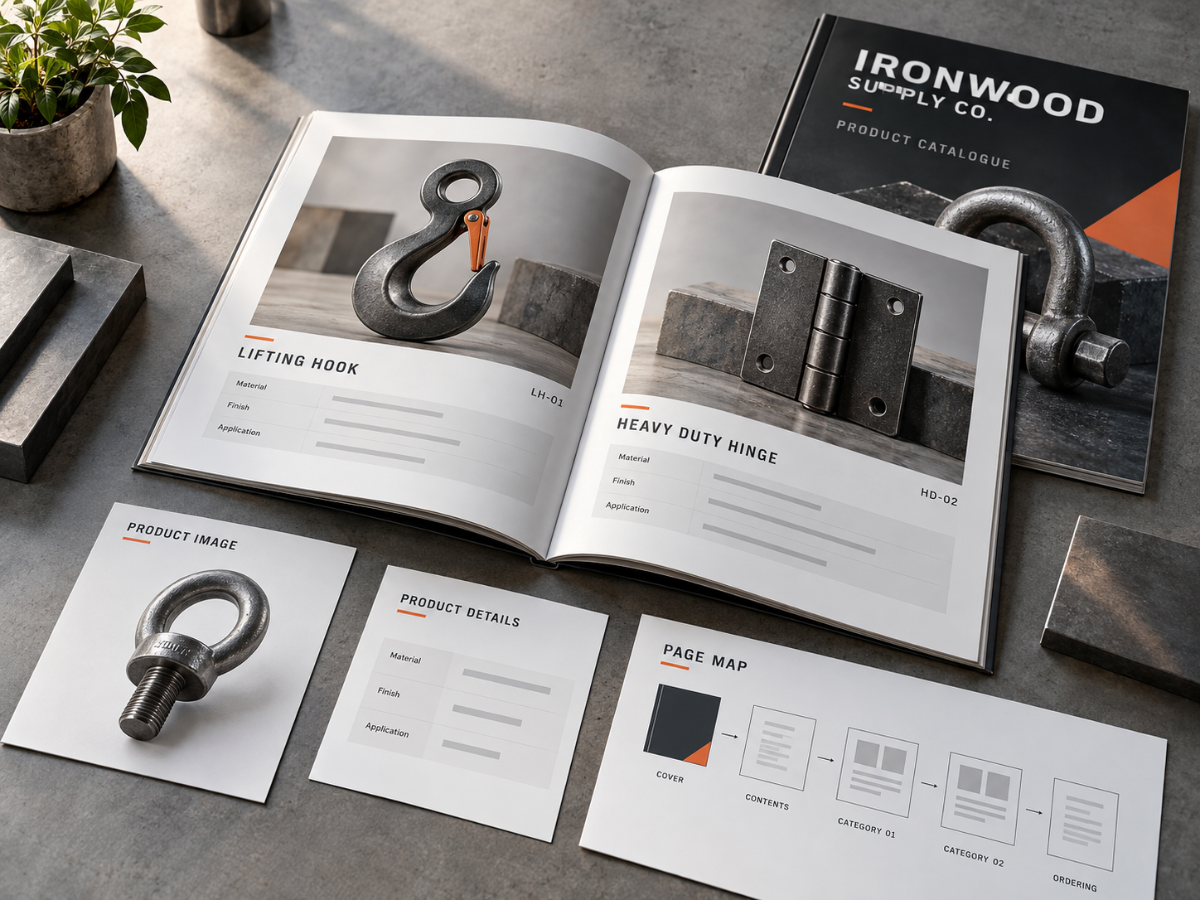
A good catalogue is not a website printed onto paper. It needs a clear product structure, consistent photography, enough specifications to support the buying decision and a page plan that helps customers move through the range without becoming overwhelmed. Build the catalogue architecture before designing individual pages.
A product catalogue can become one of the most complicated pieces a business prints.
Not because any single page is difficult.
Because the entire publication needs to remain consistent across dozens or even hundreds of products.
Every photograph needs to feel related.
Product names need a predictable structure.
Specifications need to appear in the same place.
Categories need to make sense.
Prices may change.
SKU numbers need to be correct.
Pages need to be added or removed without destroying the reading flow.
And after all that content is organized, the business still needs to decide whether the finished publication should be a short saddle-stitched booklet or a thicker perfect-bound book.
Pryntco’s existing Booklet Page Count Guide explains page planning for shorter saddle-stitched publications, while the Perfect Bound Books Guide specifically identifies product catalogues as a common use for book-style binding.
This guide focuses on everything that happens before the catalogue reaches that production decision.
1. What Is a Printed Product Catalogue?
A printed product catalogue is an organized multi-page publication used to present a range of products to customers, buyers, distributors, dealers or sales teams.
It may contain:
- Product photography
- Product names
- Specifications
- SKU or model information
- Ordering information
- Pricing where appropriate
2. How Is a Catalogue Different From a Brochure?
A brochure normally explains a company, service or relatively small group of products.
A catalogue organizes a deeper product range.
If the business needs:
- Several categories
- Many product models
- Specifications
- Comparison information
a catalogue can provide more useful structure.
3. Is a Catalogue the Same as a Booklet?
Not exactly.
“Catalogue” describes the purpose of the publication.
“Booklet” describes one possible physical format.
A short catalogue might be saddle stitched, while a thicker catalogue might use perfect binding or another suitable production method.
4. What Should You Decide Before Designing the Catalogue?
Define its job.
Ask whether the catalogue is primarily intended to:
- Generate inquiries
- Support sales meetings
- Help dealers order products
- Explain a product range
- Support trade shows
The purpose changes what information belongs on the page.
5. Who Is the Catalogue For?
Define the reader before writing the product pages.
A catalogue for consumers may emphasize:
- Benefits
- Photography
- Use cases
A catalogue for professional buyers may need more specifications, model information and ordering details.
6. Should Every Product the Business Sells Be Included?
No.
A catalogue can focus on:
- Core range
- Seasonal range
- Wholesale line
- Specific industry
- New collection
Including everything simply because it exists can make the publication difficult to navigate and quickly outdated.
7. How Should Products Be Organized Into Categories?
Use categories customers already understand.
A manufacturer might organize by:
- Product family
- Application
- Material
- Industry
Choose one dominant system instead of switching logic on every few pages.
8. How Many Product Categories Should a Catalogue Have?
There is no ideal number.
Use enough categories to make navigation easier without creating several nearly empty sections.
If a category contains only one item, consider whether it belongs inside a broader group.
9. Should Every Product Get Its Own Page?
Not necessarily.
One page per product makes sense when each item needs:
- Large photography
- Several specifications
- Detailed explanation
Closely related products may be easier to compare on one spread.
10. When Should Several Products Share a Page?
Group products when customers benefit from seeing the differences together.
For example:
- Three sizes
- Several related models
- Product family with different capacities
Keep the information aligned so comparison remains easy.
11. What Information Should Every Product Entry Include?
Create a standard information structure.
Depending on the business, that may include:
- Product name
- Short description
- Primary photograph
- Key features
- Specifications
- SKU or model
- Ordering path
The business should supply and verify all technical claims.
12. How Should Product Specifications Be Presented?
Use a consistent format.
If every product page needs:
- Dimensions
- Material
- Colour options
- Compatibility
put those fields in the same general location on every product page.
13. Why Are SKU and Model Numbers Important?
They help distinguish products that may have similar names or appearances.
SKU and model numbers can also help:
- Sales staff
- Dealers
- Buyers
- Customer service
identify the exact item being discussed.
14. Should Product Pricing Be Printed?
Only when the pricing is expected to remain useful for the life of the catalogue.
If prices change frequently, consider:
- Separate price list
- QR code
- Website pricing
- Dealer portal
An otherwise excellent catalogue should not become obsolete because one price changed.
15. Should Wholesale and Retail Prices Appear Together?
Only when the audience is supposed to see both.
Many businesses are better served by separate:
- Consumer catalogue
- Dealer price sheet
- Wholesale ordering document
Do not expose internal or restricted pricing accidentally.
16. How Important Is Product Photography?
Extremely important.
Photography often does most of the visual work in a catalogue.
Customers should be able to understand:
- What the product looks like
- Important features
- Relative form
- Available style where applicable
17. Should Every Product Photo Use the Same Background?
Not necessarily, but consistency helps.
A catalogue may combine:
- Clean product images
- Detail photographs
- Lifestyle images
Use each type consistently so the publication feels deliberate.
18. Should Product Photography Use the Same Camera Angle?
For comparison pages, consistent angles can make differences easier to understand.
Hero products may use more expressive photography.
Do not use a completely different photographic style for every product unless the brand intentionally calls for it.
19. How Should Image Resolution Be Checked?
Evaluate each raster image at the physical size at which it will appear.
Pryntco generally recommends approximately 300 DPI at final size for many printed photographs and raster graphics.
A small thumbnail and a full-page image therefore have very different pixel requirements.
20. Should Images Be Pulled From the Website?
Use original source photographs whenever available.
Website images may have been:
- Resized
- Compressed
- Cropped
and may not contain enough information for a high-quality full-page print.
21. How Should Product Variants Be Shown?
Choose a system appropriate to the product.
Variants might be shown as:
- Colour swatches
- Small thumbnails
- Specification table
- Model list
Do not dedicate a full photograph to every minor variation when a simpler comparison communicates the information better.
22. When Should You Use a Comparison Table?
A table works well when customers are deciding between several related models.
Good comparison fields may include:
- Model
- Size
- Feature
- Application
Only use specifications verified by the business.
23. How Long Should Product Descriptions Be?
Long enough to explain why the product is useful without repeating the specification table.
A strong description can answer:
- What is it?
- Who is it for?
- What makes this model different?
Technical facts can remain in the structured specification area.
24. What Should Go on the Front Cover?
The cover should identify the publication immediately.
Useful elements include:
- Company name
- Catalogue title
- Collection or edition
- Strong product image
- Year only when useful
Do not turn the cover into a product index.
25. Does a Catalogue Need a Table of Contents?
Usually, when the publication contains several product categories or enough pages that readers may need to jump directly to a section.
Use category names that match the headings inside the catalogue.
26. Should Category Divider Pages Be Used?
They can improve navigation in a larger publication.
A divider may use:
- Category title
- Strong photograph
- Short introduction
A small catalogue may not need a full page for every category.
27. What Is a Catalogue Page Map?
A page map is a simple outline showing what belongs on each page before final design begins.
For example:
- 1 → Cover
- 2 → Contents
- 3–8 → Category A
- 9–14 → Category B
- 15 → Ordering information
- 16 → Back cover
The exact structure depends on the publication.
28. Why Should the Page Map Come Before Design?
It exposes structural problems early.
You may discover that:
- One category has too many products
- Another section is nearly empty
- The total page count does not suit the intended binding
- Several products are missing photography
Those problems are easier to solve before every page has been designed.
29. How Should Page Numbers Be Used?
Keep them consistent and easy to locate.
They become especially useful when:
- Table of contents is included
- Sales staff reference products during calls
- Customers use the catalogue repeatedly
30. Should the Catalogue Be Saddle Stitched or Perfect Bound?
That depends on the final page count, stock, finished size and desired presentation.
A shorter catalogue may work naturally as a saddle-stitched booklet.
A thicker catalogue may benefit from a defined perfect-bound spine.
31. Why Do Saddle-Stitched Catalogues Use Page Counts Divisible by Four?
Saddle stitching is built from folded sheets.
Each folded sheet contributes four page faces to the finished publication.
Pryntco’s Booklet Page Count Guide explains this structure in detail.
32. When Does Perfect Binding Make Sense?
Perfect binding can make sense when the publication has enough physical thickness to support a square spine and benefits from a more book-like presentation.
Pryntco’s Perfect Bound Books Guide specifically identifies product catalogues as a common use.
33. When Should the Spine Be Designed?
After the page count, interior stock and production specification are finalized.
The physical spine depends on the finished page block.
Do not guess the spine width while the catalogue is still changing.
34. How Should Catalogue Size Be Chosen?
Choose the finished size according to the content.
A compact catalogue can be easier to carry.
A larger page provides more room for:
- Photography
- Technical tables
- Diagrams
- Several products per spread
Confirm the intended production size before building final artwork.
35. Should the Catalogue Use QR Codes?
Yes when the code provides access to information that changes more frequently than the printed catalogue.
Useful destinations may include:
- Current pricing
- Product video
- Technical documentation
- Live inventory
- Ordering page
Label every QR code clearly.
36. How Should Catalogue Version Control Be Managed?
Use a clear edition system.
Record:
- Catalogue edition
- Publication date
- Product data version
- Approved artwork file
Remove outdated catalogue versions from active sales and distribution areas when a replacement is released.
37. What Are the Most Common Product Catalogue Mistakes?
Common problems include:
- Designing pages before organizing the product range.
- Using inconsistent product names and specifications.
- Pulling low-resolution images from the website.
- Printing unstable pricing into a long-lived catalogue.
- Using several unrelated photography styles.
- Adding filler products simply to complete a page.
- Choosing binding before the final page count is known.
- Failing to proof model numbers and technical information.
38. How Should You Plan a Printed Product Catalogue From Start to Finish?
Start with the audience and the buying decision.
Choose which products genuinely belong in the publication.
Organize them into categories customers already understand.
Then create one standard product-information structure so names, models, features and specifications appear consistently throughout the catalogue.
Build a photography list before page design begins.
Identify which products need hero photographs, comparison images, detail shots or variant swatches.
Next, create the page map.
Decide where categories begin, how many products belong on each spread, where the table of contents sits and what the final ordering page needs to explain.
Only then should the complete layout be designed.
Keep pricing separate when it changes frequently and use QR codes when live information is more useful online.
Once the page count stabilizes, choose the physical format.
A concise catalogue may work as a saddle-stitched booklet, while a thicker catalogue may be better suited to perfect binding.
Finally, proof every page.
Check product names, model numbers, photographs, specifications, prices where used, QR codes, page numbers and the table of contents.
A strong catalogue should make a large product range feel easier to buy from, not simply prove how many products the company sells.
For publication planning, review Pryntco’s Printed Booklet Page Count Guide, Perfect Bound Books Guide and Business Document Printing Guide.
For a catalogue with custom page count, size, stock or binding requirements, request a custom quote or contact Pryntco.