What Should a Condo or Property Development Sales Centre Print?
What Should a Condo or Property Development Sales Centre Print?
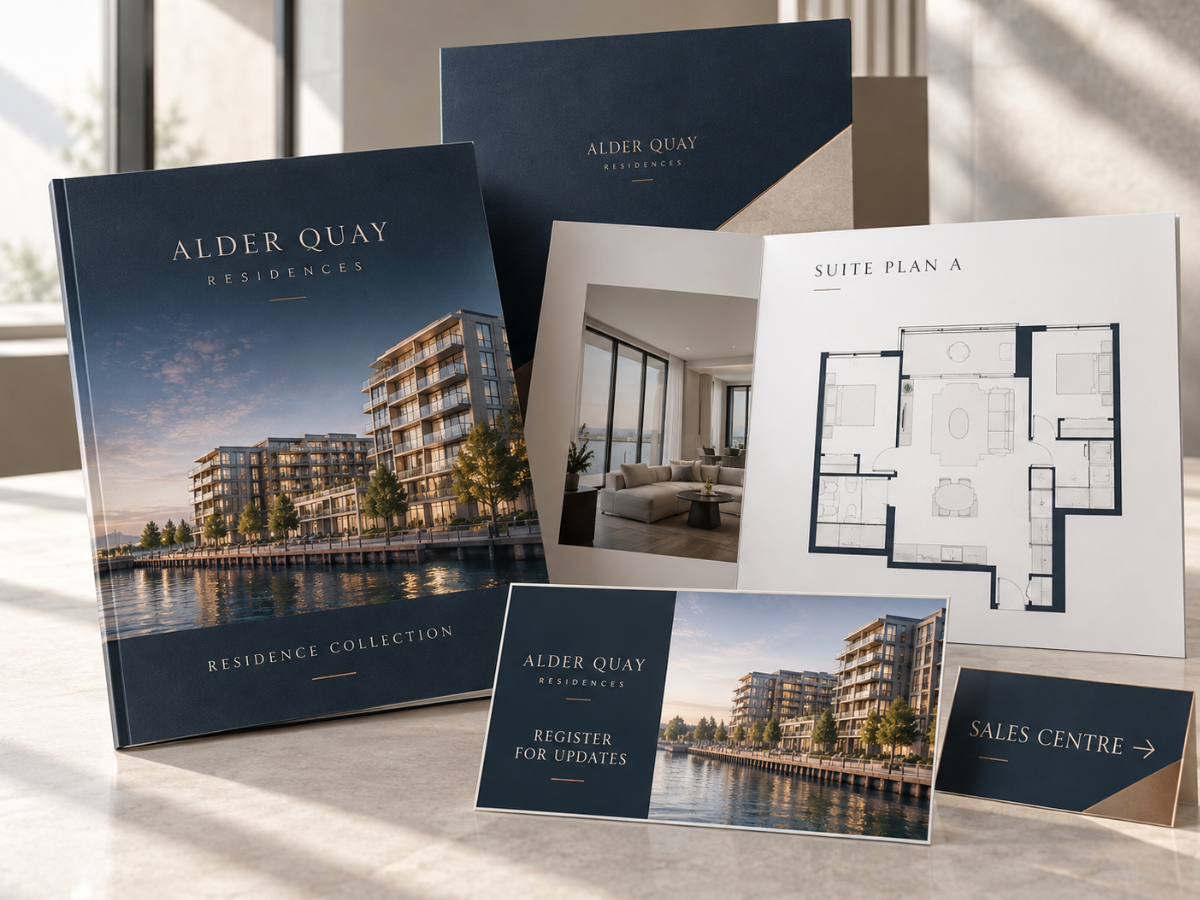
A property-development sales centre needs print at several stages of the buyer journey. Exterior signs help people find the project, brochures introduce the development, floor-plan sheets explain individual units, folders organize take-home packages and replaceable availability or pricing sheets keep changing information separate from long-lived brand materials.
A condo or property development sales centre is not simply another real estate office.
One project may need to explain an entire building, several unit types, amenities, neighbourhood context, finishes, release phases and sales appointments at the same time.
Some information is stable.
The development name and visual identity may remain unchanged for years.
Other information can change quickly.
Unit availability, pricing, incentives and release phases can change while a prospect is still considering the project.
That makes print architecture especially important.
The expensive, long-lived pieces should carry information expected to remain stable.
Changing commercial information should sit on separate sheets or digital pages that can be updated without rebuilding the entire sales package.
Pryntco already has dedicated resources for Real Estate Feature Sheets, Presentation Folders, signage and brochures. A development sales centre brings those formats together around a larger property sales journey.
1. What Printed Materials Does a Property Development Sales Centre Need?
Depending on the project, the sales centre may use:
- Exterior project signs
- Window graphics
- Brochures
- Floor-plan sheets
- Feature sheets
- Presentation folders
- Price or availability sheets
- Site plans
- Neighbourhood information
- Directional signs
- Business cards
2. Why Should Stable and Changing Information Be Separated?
Because development information does not all age at the same speed.
Stable information may include:
- Brand
- Location
- Architectural concept approved by the developer
- General amenity overview
Changing information may include pricing, availability and temporary incentives.
3. What Should People See Before Entering the Sales Centre?
The exterior should clearly identify:
- Development name
- Sales centre
- Entrance
Do not make prospects guess whether they are at the correct building or door.
4. When Are Window Graphics Useful?
Window graphics can turn the sales-centre glass into a branded project surface.
Pryntco’s current Window Decals support custom sizing for business graphics and promotional messaging.
Possible content includes:
- Development logo
- Architectural rendering
- Sales-centre identification
- Short call to action
5. Should the Entire Window Be Covered With Information?
No.
Large graphics should create recognition from outside.
Detailed:
- Floor plans
- Prices
- Unit lists
are usually better handled inside or online.
6. When Are Lawn or Site Signs Useful?
Temporary site signage can help with:
- Project identification
- Sales-centre direction
- Event wayfinding
- Approved local promotion
Pryntco currently prints Lawn Signs on 3/16" corrugated plastic with optional H-stakes.
7. When Is an A-Frame Useful?
An A-frame can provide closer-range direction near the sales centre.
Possible messages include:
- SALES CENTRE OPEN
- ENTRANCE →
- REGISTER HERE
Pryntco’s A-Frame Sign Guide covers temporary entrance and wayfinding use in more detail.
8. What Should the Main Development Brochure Do?
The brochure should tell the broad project story.
It may include approved information about:
- Development concept
- Location
- Amenities
- Selected unit types
- Developer or project team information
It should not become the place where every changing price and availability status is stored.
9. How Should a Development Brochure Be Structured?
A practical flow may be:
- Project introduction
- Location
- Architecture or exterior
- Amenities
- Residences
- Next step
Pryntco’s current Brochures support several folding styles for shorter project presentations.
10. When Does the Project Need a Booklet Instead of a Brochure?
A larger development may need more pages than a folded brochure can comfortably handle.
A booklet may be more appropriate when the project needs:
- Several amenity spreads
- Multiple unit groups
- Neighbourhood section
- Detailed project story
Choose the publication format after the content is mapped.
11. What Is a Floor-Plan Sheet?
A floor-plan sheet presents one unit layout or a small group of related layouts in a format prospects can review separately from the main brochure.
It may include developer-approved:
- Plan name
- Layout
- Room labels
- Area information
- Notes or disclaimers
The project team should supply and approve all dimensions and technical details.
12. Why Should Floor Plans Be Separate From the Main Brochure?
Because unit plans may change or expand independently from the project story.
Separate sheets also allow sales staff to give a prospect only the layouts relevant to their inquiry.
13. How Should Floor-Plan Sheets Be Organized?
Use one consistent system for:
- Plan name
- Unit type
- Orientation where approved
- Dimensions
- Legend
- Legal or project notes
Do not redesign the hierarchy for every unit.
14. What Is a Real Estate Feature Sheet?
A feature sheet presents key property information in a customer-friendly take-away format.
Pryntco’s Real Estate Feature Sheet Guide covers photography, property details and page hierarchy.
A development may adapt the format for:
- Model suite
- Specific release
- Premium unit
15. When Should a Presentation Folder Be Used?
A folder is valuable when each prospect receives several separate documents.
It can hold:
- Brochure
- Floor-plan sheets
- Availability sheet
- Price information
- Sales representative business card
The contents can change while the folder remains evergreen.
16. What Should Be Printed on the Folder Itself?
Keep the folder restrained.
Useful elements may include:
- Development logo
- Hero rendering
- Short positioning line
- Website
Do not print temporary pricing or availability on a long-lived folder.
17. How Should Price Lists Be Handled?
Keep them separate from expensive evergreen marketing pieces when prices may change.
A dedicated sheet can be:
- Reprinted
- Replaced
- Removed
without making the rest of the package obsolete.
18. How Should Availability Be Communicated?
Availability changes quickly.
A printed availability sheet can work for a snapshot in time, but the current digital inventory or sales system should remain the source of truth when appropriate.
Clearly date printed availability information.
19. Should Price and Availability Be Combined?
They can be when the sales workflow benefits from one current document.
However, both fields may change frequently.
Use a clear version date and retire outdated copies immediately.
20. What Is the Role of a Site Plan?
A site plan can help prospects understand:
- Building placement
- Entrances
- Outdoor spaces
- Neighbouring features shown by the developer
Use project-approved mapping and labels rather than creating property information from assumptions.
21. Should the Sales Centre Have a Neighbourhood Map?
It can be useful when location is an important part of the purchase decision.
The map may identify approved points such as:
- Transit
- Parks
- Shopping
- Community destinations
Keep map information current and avoid overstating travel times or convenience.
22. How Should Architectural Renderings Be Used?
Renderings can help prospects visualize a project that may not yet exist physically.
Use only imagery approved by the development team.
Any required rendering disclaimers should come from the responsible project or legal team.
23. Should Renderings Be Used on Large Signs?
Yes when they remain clear at the intended viewing distance.
A large exterior graphic may use one strong:
- Building rendering
- Amenity rendering
- Interior rendering
rather than several tiny images.
24. What Print Is Useful Around a Model Suite?
Possible materials include:
- Room identification
- Finish information supplied by the developer
- Floor-plan reference
- Directional signs
Keep sales material separate from any required building, accessibility or safety signage.
25. Should Finish Options Be Printed?
They can be when the selections are stable and approved.
A finish card or sheet may explain:
- Package name
- Material names supplied by the project
- Approved imagery
Do not invent material specifications or guarantees.
26. Should Sales Representatives Have Business Cards?
Yes when prospects need a direct contact.
The card can include:
- Name
- Role
- Phone
- Project website
Any professional designations should be supplied and approved by the representative or organization.
27. Should the Project Use Appointment Cards?
They can be useful when prospects schedule:
- Sales appointments
- Design appointments
- Model-suite visits
Use a writable surface when staff need to add the appointment details by hand.
28. How Should QR Codes Be Used?
Use QR codes for information that benefits from remaining current.
Possible destinations include:
- Registration form
- Current availability
- Virtual tour
- Project website
- Appointment booking
Label the destination clearly.
29. Should Every Printed Piece Use the Same QR Code?
No.
The destination should fit the context.
A window decal may point to registration.
A floor-plan sheet may point to current availability.
A take-home folder may point to the broader project website.
30. How Should Incentives and Promotions Be Printed?
Use a separate replaceable piece when incentives are temporary.
The project team should approve:
- Offer wording
- Eligibility
- Dates
- Conditions
Do not build temporary incentive language into permanent project graphics.
31. How Should Legal and Project Disclaimers Be Handled?
The developer, brokerage or responsible legal team should provide and approve any required wording.
This may include statements related to:
- Renderings
- Dimensions
- Pricing
- Availability
- Specifications
The printer should not invent or shorten required legal language without approval.
32. How Should Multiple Buildings or Phases Stay Organized?
Use one controlled project system.
Different phases may use:
- Approved sub-colour
- Phase name
- Building identifier
while the parent development brand remains consistent.
33. How Should Unit Numbers and Plan Names Be Controlled?
Maintain one verified source of truth.
Do not manually type plan names differently across:
- Brochure
- Floor plan
- Price list
- Website
Small naming inconsistencies can create unnecessary confusion during sales conversations.
34. Should Sales Materials Be Multilingual?
They can be when the project audience justifies it.
Use qualified translation and proof every version independently.
For large amounts of translated information, separate language versions may remain cleaner than placing several languages on one sheet.
35. How Should Sales-Centre Events Be Supported?
A launch or broker event may use:
- Directional signs
- Registration table branding
- Programs or information cards
- Photo backdrop
- Take-home sales folders
Keep event-specific dates off permanent project materials.
36. How Should Version Control Work in a Development Sales Centre?
This is critical.
Every changing document should include an internal or visible version reference where appropriate.
Track:
- Price-list date
- Availability date
- Floor-plan revision
- Incentive version
- Approved brochure file
Remove old copies instead of leaving them in drawers or folders.
37. What Are the Most Common Property Development Print Mistakes?
Common problems include:
- Printing changing pricing inside an expensive long-term brochure.
- Leaving old availability sheets in circulation.
- Using inconsistent plan names.
- Printing unapproved dimensions or project claims.
- Using low-resolution architectural renderings.
- Making exterior signs too detailed to read.
- Using several different QR destinations without labels.
- Failing to remove expired incentives.
38. What Print System Should a Condo or Property Development Sales Centre Build?
Start outside.
Make the development and sales-centre entrance easy to identify using appropriate window graphics, temporary signs and project branding.
Inside, use one strong development brochure or booklet to explain the stable project story.
Keep individual floor plans and feature sheets separate so prospects can take only the layouts relevant to them.
Use a presentation folder when those materials need to leave the sales centre as one organized package.
Keep price lists, availability and incentives separate from evergreen print because those fields can change quickly.
Connect physical materials to live digital information through clearly labelled QR codes where that improves accuracy.
Most importantly, control the versions.
A sales centre can look highly polished and still lose credibility if one printed document shows an old price while another shows a new one.
The best property-development print system separates the permanent brand from the information that changes.
For supporting pieces, review Pryntco’s Real Estate Feature Sheet Guide, Presentation Folder Guide, Window Decals and Lawn Signs.
For a coordinated sales-centre or property-development print package, contact Pryntco or submit a custom quote request.