What Should a Car Rental Company Print? Vehicle Handoffs, Forms and Customer Instructions
What Should a Car Rental Company Print? Vehicle Handoffs, Forms and Customer Instructions
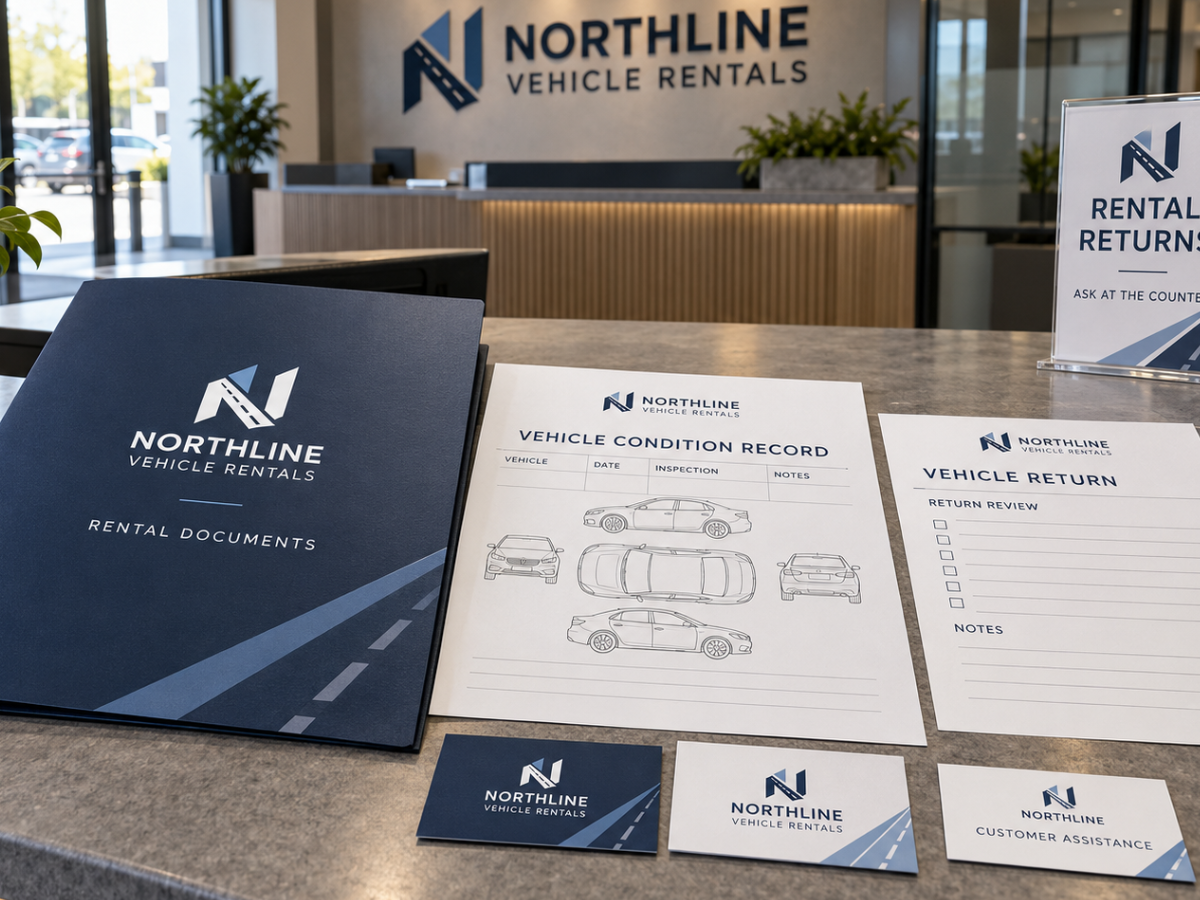
Car rental printing should support the points where customers collect, use and return a vehicle. Clear pickup instructions, approved condition records, return information and counter signage can reduce confusion during these transactions. Keep operational forms separate from promotional material, and make sure printed documents match the company's current rental procedures and official agreements.
A customer arrives at a car rental office after a long flight. They have a reservation confirmation, a pickup time and a vehicle category in mind.
At the counter, they receive their keys and several documents. An employee explains where to collect the vehicle, which area to use when returning it and how to report an issue during the rental.
By the time the customer reaches the parking area, they may remember only part of that conversation.
A clear printed handoff sheet can provide a useful reference. So can a properly designed vehicle condition record, an identifiable return-area sign and a customer contact card.
Car rental businesses operate around transactions that have several stages. Customers need accurate information at pickup, while they're using the vehicle and when the rental ends.
The right printed materials help organize those stages. They should not introduce unapproved rental terms or replace the company's official records.
The Rental Process Should Determine the Print Package
Before ordering business stationery or customer forms, follow the complete rental transaction.
A typical workflow may involve a reservation, counter check-in, vehicle collection, condition review, customer use and return inspection.
The business may handle some or all of those steps digitally.
Where physical materials are useful, their purpose should be clearly defined.
| Customer Stage | Possible Printed Material | Purpose |
|---|---|---|
| Arrival | Counter and directional signs | Help customers find the correct service area |
| Pickup | Approved rental information sheet | Provide relevant collection and contact details |
| Condition review | Vehicle condition form | Support the company's established recording procedure |
| During rental | Customer assistance card | Provide approved contact information |
| Return | Return instructions and relevant forms | Clarify the required handoff process |
| General marketing | Business cards, flyers, window graphics | Introduce the rental service |
A small independent operator may use a relatively simple set of documents. A business managing several locations and a larger fleet may need more formal version control and standardized paperwork.
Pickup Instructions Should Be Easy to Follow
Pickup is one of the first opportunities for confusion.
Customers may need to find a specific parking area, vehicle bay or customer-service desk. In larger facilities, several businesses may share the same property.
A short pickup reference sheet can identify the relevant location and tell the customer where to obtain assistance.
The information should match the company's established collection procedure.
Depending on the operation, useful fields may include:
- Rental office or branch.
- Approved collection location.
- Customer assistance contact.
- General pickup instructions.
- Other information required by the operator's procedure.
Do not include sensitive personal details or vehicle access credentials on generic handouts.
Where pickup instructions change frequently, direct customers to an authorized current information source rather than printing large quantities that may become outdated.
Why Vehicle Condition Forms Need Careful Design
Vehicle condition records can play an important role in a rental company's established inspection process.
When a physical record is used, employees need a layout that makes observations easy to document.
A form may contain the appropriate vehicle reference, date, inspection stage and space for observations.
Some businesses also use a simplified vehicle outline that allows an employee to mark relevant exterior locations.
That illustration should be clear enough for the approved procedure, with sufficient room for corresponding written notes.
A crowded form with tiny diagrams can create ambiguity rather than improve documentation.
The content, authority to complete it and any acknowledgements must be established by the rental business. A marketing designer should not invent liability terms or assume that a marked diagram alone establishes a complete vehicle condition record.
How to Design a Useful Vehicle Condition Diagram
The purpose of a condition diagram is to help staff identify where an observation relates to the vehicle.
Its design needs to reflect the company's actual process and fleet.
A basic diagram might use separate simplified vehicle views, with numbered observation references rather than lengthy text squeezed directly onto the illustration.
For example, an employee could mark a location on the vehicle outline and record the approved observation in a corresponding notes area.
The diagram must be understandable in the final printed size.
Consider whether the form requires:
- Suitable vehicle views.
- Space for the vehicle identifier.
- Inspection date and stage.
- Reference markers for observed areas.
- Readable notes fields.
- Appropriate employee identification.
- Any required customer acknowledgement established by the business.
Do not add universal damage categories, charges or legal wording without approval.
Should the Pickup and Return Use the Same Form?
A consistent form structure can make comparisons easier, but it must suit the actual workflow.
Some operators may record pickup and return conditions in separate documents. Others may have an approved system that connects both stages.
The main requirement is that employees can distinguish what was recorded before the rental from what was recorded afterward.
Clear headings, dates, vehicle references and document version information can help.
Do not use a form that leaves the inspection stage ambiguous.
If the company already uses a digital condition-management system, printed records should be evaluated for a specific operational need rather than introduced as a conflicting second source of information.
When Are Carbonless NCR Forms Useful?
A rental counter may need matching copies of an approved paper document for different recipients.
Carbonless NCR forms allow information entered on the top sheet to transfer to additional sheets, subject to the form's construction and proper use.
For example, a business with an established paper process might need separate copies for the customer, counter operations and internal administration.
That makes a multi-part form potentially useful, provided every copy serves an actual purpose.
Pryntco lists 3-Part NCR Forms in its current catalogue.
The standard product is a three-part carbonless form. It should not be assumed to include variable numbering or other specialized features unless those are confirmed for the order.
Before designing a custom rental form, establish the approved fields, required copy distribution, physical dimensions and applicable document requirements.
Printed Forms Cannot Replace an Accurate Vehicle Record
A printed checklist may support a rental company's inspection process, but it cannot automatically establish the condition of a vehicle.
For example, a diagram showing the location of an observed mark may be useful alongside approved photographs or other records.
The business must determine which information is required, how observations are verified and how records are retained.
Employees should follow the company's established process rather than relying on an improvised printed checklist.
Similarly, a form should not make promises about the absence of damage or the customer's responsibilities beyond the company's approved documents.
Print quality helps make the record readable. It does not establish the legal effect or factual accuracy of its contents.
A Customer Information Card Can Be More Useful Than a Long Brochure
Once a customer has collected a vehicle, they may need a convenient way to contact the rental company.
A small printed card can identify the relevant assistance channel and direct customers to approved rental information.
Depending on the company's arrangements, the card might contain:
- Company and branch identification.
- Appropriate support contact.
- Website or official information destination.
- Approved guidance about where to direct questions.
Do not print universal roadside procedures, insurance promises or emergency advice that has not been approved by the operator.
Any urgent assistance instructions must come from the responsible business and its service providers.
A compact card can be placed in an approved customer document package or handed out at the counter.
Why Return Instructions Deserve Their Own Material
Vehicle returns can be more complicated than customers expect, particularly at large facilities or locations with different arrangements outside regular business hours.
A rental customer may need to know which entrance to use, where to park and how the approved return procedure works.
A clear return sheet can provide that information without requiring the customer to remember the original counter conversation.
Keep it focused on the actual location.
Directions intended for one branch should not be printed on a generic card distributed at every office if their procedures differ.
If the business permits after-hours returns, the instructions must reflect the approved process. Do not invent key-drop arrangements, liability statements or access procedures.
How to Design a Return-Area Sign
At a rental facility, the most useful signs are often the simplest.
A driver approaching the property needs to recognize the correct vehicle-return area before reaching a confusing junction or parking lot entrance.
A sign might identify:
RENTAL VEHICLE RETURNS
Approved directional information
Additional details only when necessary
The final wording and arrow placement should reflect the actual property layout.
Don't fill a directional sign with promotional offers or extensive instructions.
Where a temporary or non-regulatory printed board is appropriate, Pryntco's Rigid Signs category provides several material options.
Permanent traffic-control, safety, accessibility or legally required signs must follow the relevant professional and regulatory requirements.
Reception and Counter Signage
Rental counters often need to communicate operational information to customers who may be unfamiliar with the process.
Well-designed counter materials can help explain where to check in or obtain current rental information.
The content should remain limited to what the customer needs at that moment.
For example, a sign directing a customer to the official booking or reservation-management page may be useful.
However, pricing, deposit requirements, eligibility conditions and other commercial information must be accurate and approved.
A small tabletop display can be easier to update than a permanent wall graphic when the message changes regularly.
Are Window Graphics Worth Using?
Window graphics can identify the rental office and help customers distinguish it from neighbouring businesses.
They may be particularly useful at a shared commercial property where several service counters are located near one another.
A clear company name, logo and relevant customer-service message may be sufficient.
Don't cover the entire window with a list of rental categories or promotional claims if doing so makes the office harder to recognize or interferes with necessary visibility.
Pryntco offers Window Decals for business storefronts and other suitable glass applications.
Measure the actual window panels and confirm installation conditions before preparing the artwork.
Printed Folders for Customer Documents
A folder may be useful when the customer receives several physical documents during a rental.
Rather than permanently binding everything into one booklet, a folder can accommodate the specific documents associated with the transaction.
Depending on the operator's process, that might include approved rental paperwork, condition records and customer information.
Pryntco provides Presentation Folders for organizing professional document packages.
Keep confidential customer documents inside the appropriate packet rather than leaving completed paperwork visible on a service counter.
If customers receive everything through an authorized digital system, a physical folder may be unnecessary.
Business Cards for Rental Locations and Account Representatives
General counter enquiries and commercial account relationships don't always need the same contact information.
A business customer managing several vehicle rentals may benefit from a direct contact card for an authorized account representative.
A walk-in customer may only need the branch's general telephone number and current website.
Use separate card versions when their purpose differs.
Pryntco's Standard Business Cards can support staff and location-specific contact designs.
Before ordering for several employees, verify each person's approved details and decide how frequently cards are actually distributed.
Do Car Rental Companies Need Flyers?
Flyers may be useful for a specific local marketing campaign, but they should not be the centre of the company's operational print system.
A rental business may want to introduce a new branch, establish a local commercial account programme or communicate an approved service offering.
Each campaign should have one clear purpose.
Do not print unsupported claims about vehicle availability, insurance coverage, prices or rental eligibility.
Where pricing or fleet availability changes frequently, direct customers to an appropriate current inquiry destination instead of relying on a long-lived printed promotion.
Pryntco offers Flyers for local business marketing and approved promotional information.
Multiple Rental Branches Need a Common Template
A rental company operating from several offices benefits from consistent branding and document structure.
However, location information must not be confused.
For example, the pickup instructions for an airport office may differ substantially from those for a downtown branch.
Use one approved design system while maintaining separate location-specific content.
Each printed version should have its own clearly identified branch, contact information and applicable procedures.
A location matrix can help the operations team review:
- Official branch name.
- Address and customer entrance.
- Relevant telephone numbers.
- Approved pickup instructions.
- Approved return instructions.
- Current artwork version.
- Quantity required.
Don't assume a change to one location should automatically be reproduced across every branch.
Privacy Matters on Rental Documents
Rental transactions can involve personal information, vehicle identifiers and other records that require controlled handling.
A printed document should contain only the information necessary for its intended function.
The company must establish its procedures for collecting, protecting, retaining and disposing of customer information according to applicable requirements.
Completed forms should not be left where unrelated customers can read them.
Similarly, a generic printed handout should not contain a customer's personal details or sensitive access information.
Marketing and print-production teams should not independently decide what identification information must be copied or retained.
How Much Should the Company Print?
Different materials have different useful lives.
General business cards and company folders may remain usable for an extended period if the business information is stable.
Location-specific instructions may need updating whenever the branch changes its pickup or return arrangements.
Operational forms should be forecast using actual transaction volume and the company's established documentation process.
For example, if a fictional location expects 200 rental transactions during a period and uses one approved paper form per transaction, its planning requirement begins with those 200 forms plus an appropriate reserve.
That does not establish the available Pryntco order quantity. The company should compare its requirement with the selected product's current ordering options.
Avoid overproducing forms if the rental process or required wording is under review.
Common Car Rental Printing Mistakes
Most avoidable mistakes arise when a generic design is used for documents that need operational precision.
- Using the wrong branch information on pickup instructions.
- Printing return directions without verifying the actual property layout.
- Creating vehicle condition forms without sufficient writing space.
- Failing to distinguish pickup and return records.
- Using diagrams that are too small for practical inspection notes.
- Adding unapproved charges, coverage wording or liability statements.
- Assuming standard carbonless forms include variable numbering.
- Distributing out-of-date rental terms or promotional prices.
- Exposing personal information on public-facing printed material.
- Printing a large inventory of documents while procedures are changing.
- Using a paper record that conflicts with the company's official digital system.
Final Print Review Before Production
The rental company's operations team should approve functional paperwork before the design is sent to print.
Check the following:
- Correct business and branch identification.
- Current approved pickup and return procedures.
- Accurate customer support contact details.
- Appropriate fields for the intended inspection or transaction.
- Readable text and vehicle diagrams at final size.
- Approved rental terms and document wording.
- Proper separation of public and confidential information.
- Confirmed carbonless form specifications where applicable.
- Correct quantities for each location.
- Consistent artwork versions.
- Suitable paper or sign materials for the intended use.
- Final exported artwork reviewed and approved.
A Better Print System for Vehicle Rentals
Printed material should support a rental transaction without making it more complicated.
At collection, customers need understandable location and contact information. During vehicle inspection, employees need records designed around the approved procedure. At return, clear directions and consistent documentation can make the handoff easier to manage.
General business cards, office graphics and promotional flyers serve a separate purpose: helping customers recognize the business and contact the right location.
The most useful system keeps those roles distinct while maintaining one recognizable company identity.
Pryntco provides business cards, presentation folders, 3-part NCR forms, flyers and commercial signs that can support these different needs.
For coordinated rental-office materials or custom operational documents, request a quote from Pryntco with the approved artwork, required quantities and relevant product specifications.