How Should a Business Print a Price List or Service Menu Without Making It Obsolete?
How Should a Business Print a Price List or Service Menu Without Making It Obsolete?
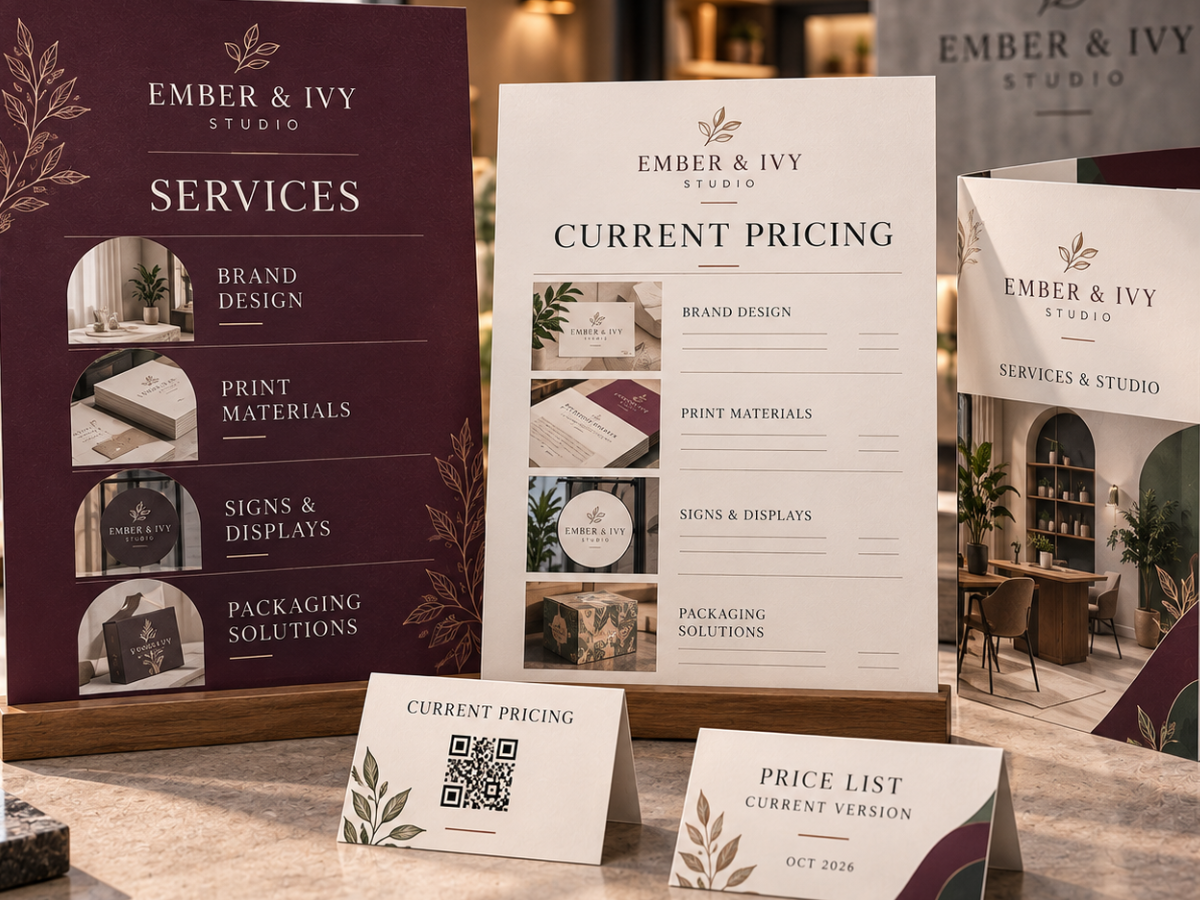
A printed price list becomes obsolete when too much changing information is locked into one expensive piece. Keep stable service descriptions on long-lived materials, move frequently changing prices and promotions onto replaceable sheets or digital pages, and make the version date easy for staff to verify.
Almost every service business faces the same print problem eventually.
The company needs customers to understand what it offers.
A printed service menu or price list seems like the obvious answer.
Then one price changes.
A new service is added.
An old package is removed.
A temporary promotion ends.
Suddenly, hundreds of beautifully printed pieces contain information the business no longer wants customers to see.
The solution is not to avoid print.
It is to separate information according to how often it changes.
Pryntco’s current Menus, Flyers, brochures and rack cards can all support service information, but the correct format depends on how stable the content is and where customers will read it.
1. What Is a Printed Service Menu?
A service menu is a customer-facing piece that organizes what a business offers.
It may include:
- Service names
- Short descriptions
- Packages
- Prices
- Add-ons
- Booking information
The exact content depends on the business.
2. What Is the Difference Between a Service Menu and a Price List?
A price list focuses primarily on cost.
A service menu gives more context around the offering.
For example, it may explain:
- What the service includes
- Who it is for
- How options differ
3. Which Businesses Commonly Need Printed Service Pricing?
Examples include:
- Salons
- Spas
- Barbers
- Photography studios
- Auto-service businesses
- Cleaning companies
- Contractors
- Fitness businesses
- Consultants
The amount of pricing detail varies by industry.
4. What Is the Biggest Risk With Printing Prices?
Obsolescence.
A printed piece remains physically unchanged even when the business changes its pricing.
If the price is likely to move, the business needs a clear replacement strategy.
5. Which Information Is Usually Stable?
More stable information may include:
- Business name
- Core service categories
- General process
- Brand positioning
- Contact information when unchanged
These are better candidates for longer-lived materials.
6. Which Information Changes More Often?
More volatile information may include:
- Prices
- Limited-time packages
- Promotions
- Seasonal services
- Staff-specific pricing
These should be easier to replace.
7. Should Prices Be Printed at All?
Yes when customers benefit from seeing them and the business expects the information to remain accurate long enough to justify printing.
Print becomes less practical when prices change constantly.
8. When Should Pricing Stay Online Instead?
Digital pricing may be better when:
- Prices change frequently
- Availability affects cost
- Quotes are highly customized
- Several locations have different rates
Print can still explain the services and direct customers to the current page.
9. Can Printed and Digital Pricing Work Together?
Yes.
A printed service menu might show:
- Service categories
- What is included
- General customer guidance
while a QR code opens the current pricing page.
10. Should a QR Code Replace All Printed Information?
No.
The physical piece should still make sense without forcing the customer to use a phone.
Use the QR code for information that benefits from being current.
11. When Is a Flat Menu-Style Sheet Useful?
A flat menu can work well when the service list fits comfortably on one or two sides.
It may suit:
- Salon services
- Studio packages
- Cleaning services
- Fitness classes
Pryntco’s live menu product supports both single- and double-sided configurations.
12. When Is a Flyer Better?
A flyer works well when the price list is part of a promotion or short-term campaign.
For example:
- Seasonal service
- New-customer package
- Temporary special
Because the content is short-lived, it should not be treated like permanent brand collateral.
13. When Is a Brochure Better?
A brochure is useful when the service menu needs several organized sections.
It may include:
- Service category
- Process
- Packages
- FAQs
- Contact information
Keep unstable prices on a replaceable insert when possible.
14. When Is a Rack Card Better?
A rack card can work for one focused service category or compact price overview.
It is especially useful in:
- Reception areas
- Partner locations
- Waiting areas
Pryntco’s current rack cards use a compact display-ready format.
15. Should Every Service Have a Price Beside It?
Only when a fixed or clearly defined price actually exists.
Do not force a custom service into a fixed number merely because the print layout expects one.
16. When Should “Starting From” Pricing Be Used?
Only when the business genuinely uses that pricing structure and can explain what affects the final cost.
The wording should not create a misleading expectation.
If the service normally requires a quote, say so clearly.
17. Should Custom Services Show “Request a Quote” Instead?
Yes when the final price depends on variables such as:
- Project size
- Materials
- Scope
- Location
A quote-based service does not need an artificial fixed price.
18. How Should Packages Be Printed?
Make the differences obvious.
A package comparison should show:
- Package name
- What is included
- Price where fixed
Avoid vague names such as Silver, Gold and Platinum unless the included services are explained clearly.
19. Should Add-On Prices Be Included?
They can be when add-ons are common and stable.
Keep them in a separate section so the main service list remains readable.
20. How Should Staff-Specific Pricing Be Handled?
If different team members have different rates, consider whether a printed piece will remain manageable.
Options include:
- Separate staff cards
- Digital pricing
- General starting ranges where accurate
Avoid creating a confusing grid that becomes outdated whenever staffing changes.
21. How Should Multi-Location Pricing Be Handled?
If each location has different rates, use location-specific versions.
Clearly identify:
- Location name
- Address where relevant
- Version date
Do not circulate one price list across branches when the prices differ.
22. Should a Price List Include a Version Date?
Yes when prices are expected to change.
A small line such as:
Pricing effective October 2026
can help staff identify whether they are holding the current version.
23. Where Should the Version Date Go?
Place it somewhere visible but secondary.
Possible locations include:
- Bottom margin
- Back panel
- Footer
Staff should be able to find it without making it part of the main sales message.
24. Should Expiry Dates Be Used?
Use them for genuine temporary promotions.
Do not place arbitrary expiry dates on an ordinary long-term service menu.
Any conditions should be clear.
25. How Should Temporary Promotions Be Separated?
Use a separate:
- Flyer
- Insert
- Tent card
- Small poster
rather than rebuilding the permanent service menu.
26. Should a Service Menu List Every Possible Option?
No.
A huge list can make the business harder to understand.
Group related services into logical categories and move unusual custom work to a consultation or quote process.
27. How Much Description Does Each Service Need?
Enough to explain the difference.
A short description may cover:
- Main outcome
- What is included
- Who the service suits
Do not repeat the same generic marketing wording under every item.
28. Should Service Duration Be Printed?
Only when the duration is stable and meaningful to the customer.
If timing varies materially by customer or project, avoid creating a false expectation.
29. Should Taxes or Fees Be Explained?
The business should provide the correct pricing and disclosure wording required for its services.
Do not invent tax, surcharge or fee language during design.
30. How Should Regulated or Professional-Service Pricing Be Handled?
The responsible business should review all required wording, disclosures and professional rules before printing.
The printer should reproduce approved information, not create regulatory claims.
31. How Should Customers Be Directed to the Current Price?
When digital pricing is used, provide one obvious route.
For example:
SCAN FOR CURRENT PRICING
followed by a tested QR code and readable website destination.
32. Should a Service Menu Be Laminated?
Lamination may make sense for a frequently handled piece, but it also makes the printed version less convenient to update.
Use it when the content is stable enough to justify a more durable finished piece.
33. How Many Price Lists Should Be Printed?
Order according to how long the pricing is expected to remain current.
Consider:
- Number of locations
- Customer traffic
- How often prices change
- Whether customers take copies home
Do not chase a larger quantity discount if most of the stock may become obsolete.
34. How Should Old Price Lists Be Removed?
When a new version becomes active:
- Remove old counter copies
- Remove old brochures
- Check staff drawers
- Replace display holders
Leaving one old version in circulation can create avoidable customer confusion.
35. What Should Be Proofed Before Printing?
Confirm:
- Service names
- Current prices
- Package inclusions
- Add-ons
- Version date
- Contact information
- QR destination
36. What Are the Most Common Price-List Printing Mistakes?
Common problems include:
- Printing too many copies before a price change.
- Mixing permanent branding with temporary promotions.
- Using outdated versions at different locations.
- Listing fixed prices for services that actually require quotes.
- Adding too many services in tiny text.
- Using a QR code without explaining what it opens.
37. What Is the Best Way to Make a Printed Price List Last Longer?
Separate the information by lifespan.
Keep stable service descriptions on the main printed piece.
Keep volatile pricing, offers and seasonal information on:
- Replaceable insert
- Short-run flyer
- Current web page
This prevents one small change from invalidating everything.
38. How Should a Business Print a Service Menu Without Making It Obsolete?
Begin by asking which information is likely to remain true for the next several months and which information may change next week.
Build the long-lived printed piece around the stable information.
Use clear service categories, concise descriptions and the core brand identity.
If prices are stable, include them.
If prices change frequently, move them to a separate replaceable sheet or a clearly labelled current online page.
Keep temporary discounts and seasonal offers out of the permanent service menu.
Add a version date so staff can identify outdated copies quickly.
Print quantities based on the expected life of the pricing, not simply the lowest cost per piece.
Then establish a replacement process so old copies are actually removed when a new version launches.
The goal is not to create a price list that never changes.
It is to design the system so a normal business change does not force the company to throw away every piece of printed marketing it owns.
Pryntco currently offers Menus, Flyers, Brochures and Rack Cards that can support different pricing and service-menu formats.
For a custom price-list or service-menu format, contact Pryntco or submit a custom quote request.